
Content Creation Guidelines
Guide to Posting on the Admin Interface
After logging into Klarda's admin interface, go to Homepage => Post
Select "Create Post" to start.
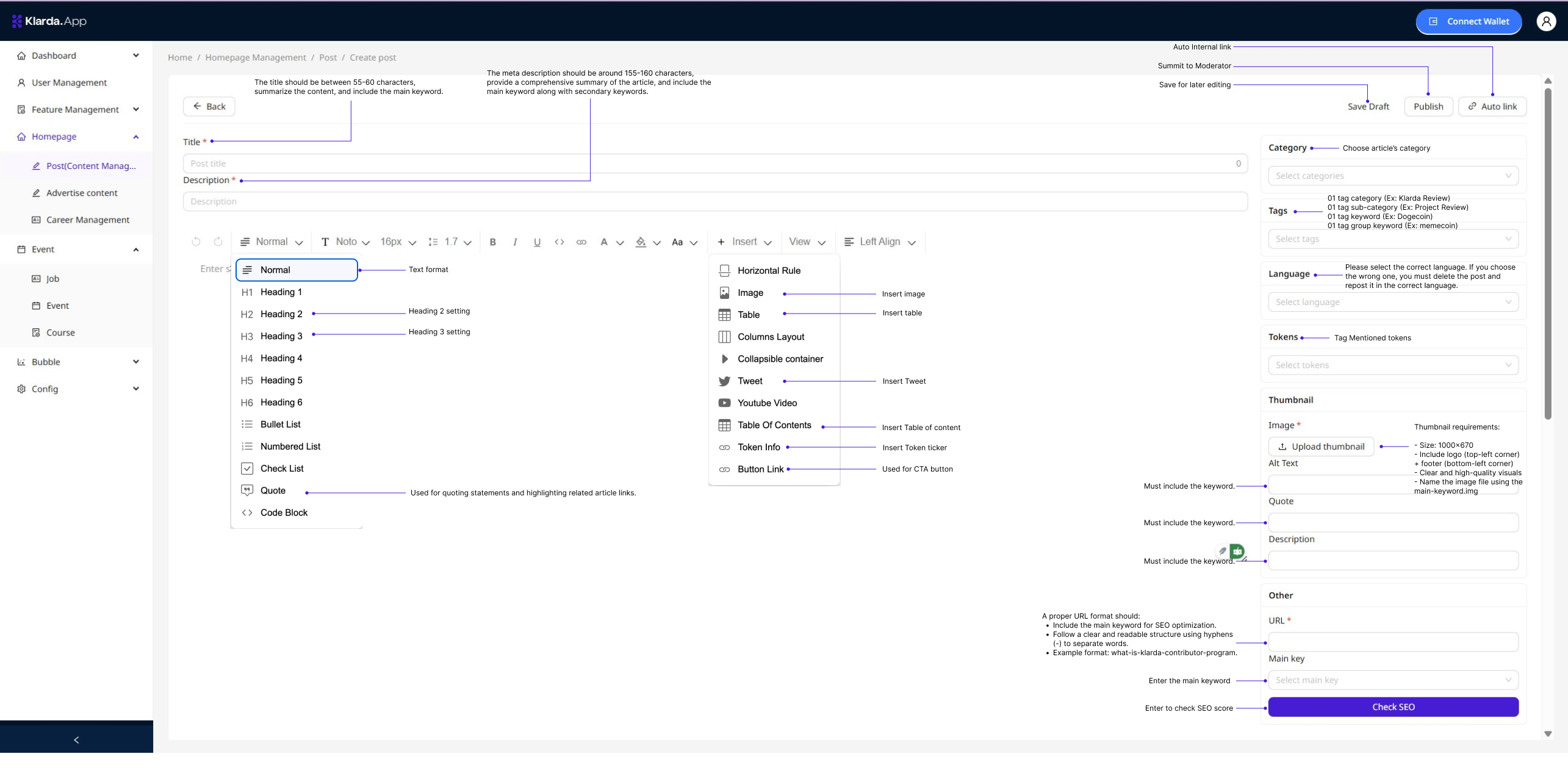
Below are the functions of each tool in the admin dashboard:
SEO best practices for blog posts
| STT | Category | Standard |
|---|---|---|
| 1 | Search Intent | Understand the search intent and the ultimate goal of users when they search for keywords. |
| 2 | Title | The title should be between 55-60 characters, summarize the content, and include the main keyword. |
| 3 | Meta Description | The meta description should be around 155-160 characters, provide a comprehensive summary of the article, and include the main keyword along with secondary keywords. |
| 4 | Keyword | The main keyword should appear in:
|
| 5 | Related Keywords | Insert secondary keywords throughout the article and bold 50% of them. |
| 6 | Body of content | Ensure there are no spelling mistakes. Use short, clear sentences. Each paragraph should be 3-4 lines long. Content must be 100% unique. Cite data sources with the reference date. |
| 7 | Thumbnail | Thumbnail requirements:
|
| 8 | Images in content | Article image guidelines:
|
Updated over 1 year ago
Did this page help you?